
An app that is meticulously developed by you. Ready for production. The very last reviews within your lovely AI's tests.. All done. It is finally the time for you to take it to the next step: designing a marketing side to showcase it, illustrating staffs, cool animations and pretty much everything to dazzle your potential clients.
The Fact
Opening the browser tools confidently then running a test for mobile devices.
But...
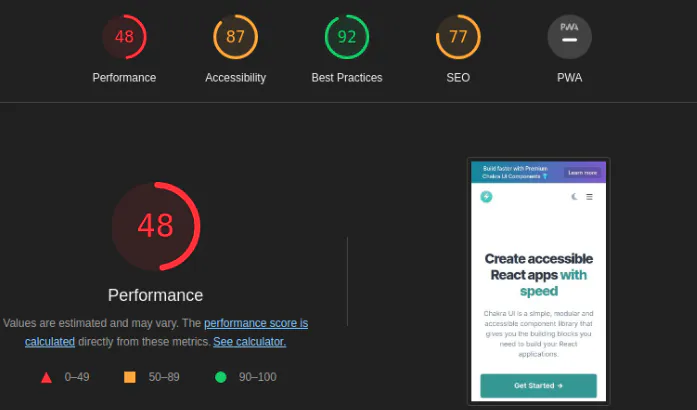
A sudden disappointment, frustration perhaps even blaming the AI you used because, as you know, better metrics mean a higher ranking.
So, how do you fix it? Maybe you used too many bulk animations, or maybe the images you used were much larger in terms of size and format?
The Reason
Most solopreneurs in the AI era may face such issues, especially regarding Core Web Vitals metrics. We want to deploy something that grabs attention in exchange for hope. Then, it turns out that a batch of chunks are loaded simultaneously while the site is painted on the user's screen, impacting the UX hence the performance.
Even though the site was developed with SSG in mind as the rendering strategy, it may still lead to congestion in terms of performance as more features are added. Therefore, it always needs optimization.
The Solution
Let's build an imaginary marketing site with a single page where we can navigate to different sections of the app, such as FAQs and Pricing. The app is built on Next.js (with the pages router and static export) and React with TypeScript.
The term single page doesn't mean the app is single-page app. Please consider that those are different things. Single-Page Application (SPA) refers to the single HTML document sent by the server.
In src/pages/index.tsx, we could export everything done like this (excluding the app provider and utilities).
At this point, we have assumed that the core issues with the metrics were merely concerned with JavaScript load. Therefore, we have a couple of optimization methods to defer JavaScript chunks and render them on demand.
- Lazy loading using dynamic() HOC — specific for Next.js if you're unfamiliar with it you can think it as React.Lazy().
- On-demand Loading/Rendering via IntersectionObserver() API.
Using the hypothetical metric of lazy loading would yield results like the graph below,
Speaking of which, the IntersectionObserver API usage for off-loading sections below the fold would have looked like this:
For clarity, I have put everything in a comparison table.
| Optimization | JS bundle | Hydration | Main-thread work |
|---|---|---|---|
| Dynamic imports via dynamic() | Reduced initially | Reduced initially | Reduced initially |
| IntersectionObserver | Unchanged | Unchanged in this scenario | Potentially reduced |
| Both together | Reduced initially | Reduced initially | Potentially reduced further |
What are Lazy Loaders and Intersection Observers?
Briefly, the Lazy loading is a strategy to identify resources as non-blocking (non-critical) and load these only when needed while The Intersection Observer API provides a way to asynchronously observe changes in the intersection of a target element with an ancestor element or with a top-level document's viewport.
The mixture of both isn't different than "everything nice" which Professor Utonium has been saying for years in the intro of Powerpuff Girls 😀
The Implementation
Starting from pointing out the component renders above-the-fold. In our case, these components are the first with which users interact,
Therefore, the correct approach is to put everything else aside.
Let's add our lazy loading in our Next app,
Although it looks straightforward and maintainable, the implementation above is misleading due to the usage of ssr:false. Next's dynamic indicates that setting ssr to false implicitly disables the prerendering ability of the components.
Caveat: The component's HTML will not be included in the initial DOM, which will result in poor SEO. Therefore, the above implementation requires crucial refinements that we will discuss to ensure the contents of the site section are visible on the server side.
Initially, the DOM renders almost nothing. I built and exported the project statically using the above misleading version and wrote a tiny script to simulate the behavior. The script imports all the components on the page using the dynamic()for lazy loading with SSR set to false.
First, I served the app since the pages router being used with export: out config to utilize the benefits of SSG by using,
It started the server that I could listen on http://192.168.10.125:3000
Then, I used the fetch()method to gather information from the site that pointed to the hosted network,
This returned the entire initial HTML content as a string. Then, I grabbed the result of the function and put it into the Node.js script to save its content as HTML for inspection.
And...
Here is the exported snippet of the HTML body content after running the script above,
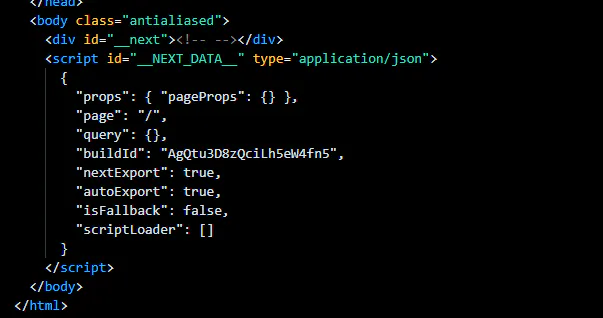
You're not wrong. There's nothing in the body context 😀, but the user eventually sees the actual content. This is what search engines encounter when they crawl your site.
So, how do we fix it?
The Fix
For example, let's take a look at the content of DxComparisonSection component,
It contains descriptive text and other components that should be added to the initial HTML to be rendered on the server side, along with other useful semantic elements.
In order to move the valuable content to the server side while keeping the interactive and dependency-heavy components on the client side, we must call the dynamic HOC directly within this component and its child components, rather than outside of them.
The Decision
But how do we decide which elements to wrap with a dynamic element and which to leave alone?
Simply, by measuring the bundle size of each component that is being used. In this case we use Next.js so Next has an analyzer called next bundle analyzer.
If you haven't heard about it or a newbie, I strongly recommend you to check out my previous Live Next.js Bundle Analysis: Measuring the Impact of Replacing a Syntax Highlighting Library. Everything you may need to understand what to lazy load, comprehensively mentioned in that article, cheers 🥂
Before wrapping a component with dynamic() or any other lazy loading workaround, consider the following:
- Am I dealing with something that is relatively heavy compared to others?
- Does it include SEO matter materials such as texts or images?
If you say yes to these both, then you can feel confident to apply lazy loading like I felt for the ones that I said "yes" below,
Now, let's look at the resulting HTML content. I'll export only the part of the page component where we applied lazy loading.
As you can see, we properly applied lazy loading to the required components. Repeating this process for the other components will significantly reduce loading time and improve performance metrics.
Applying on-demand loading with IntersectionObserver API
Next, we will extend lazy loading with the support of IntersectionObserver.
I have seen many different implementations of this API. In this article, I will present my own.
React is designed to encourage the use of reusable components and hooks. Here is the hook, but I won't go into detail about it since this article isn't about a React course.
In short, it identifies the HTML element being examined and observes its relationship with the user's viewport in relation to the given options.
Using this solely inside the app's component where we use the dynamic() hook isn't practical, so I created a provider called IntersectionProvider.
Depending on the outbound status of the useIntersectionObserver hook for the wrapper element (the div in this case), it conditionally renders the wrapped component.
The usage is as simple as writing your first Hello World in programming,
So here is the final code above.
Summary
Optimizing a statically generated Next.js page doesn't mean sacrificing its server-rendered content for better JavaScript loading performance. We explored how to combine Next.js dynamic() imports with the IntersectionObserver API to defer heavyweight, interactive components while keeping meaningful content available in the initial HTML.
Along the way, we examine the SEO drawbacks of indiscriminately applying ssr: false, identify which components are worth lazy loading through bundle analysis, and build a reusable useIntersectionObserver hook alongside an IntersectionProvider to render below-the-fold components on demand.
The key takeaway: Lazy-load what is expensive, preserve what matters, and let the user's viewport determine when the remaining work should happen.