
Today, I am going to do something I have never done before. This article will be updated as I work to replace the existing syntax highlighter library on this site with a newer one.
I've done this benchmarking-like staffs in my side projects as well as at work, so I'm pretty confident in it.
The Goal
Basically, think of this as a live journal. I won't use AI at any point during this process, so I can only explain things based on the goal.
Throughout the process, I will share timestamps so you can measure how long it takes to analyze something that is already in production from scratch.
Preparatory Work
Thursday, October 29, 2026 (UTC+1) 2:35 PM
So at first, take a look at what I'm replacing and why.
I've been all the time rendering the code snippets in my articles using next-mdx-remote-client which is a wrapper of @mdx-js/mdx for nextjs apps in order to load MDX content alongside the essential supplements rehype-slug and remark-gfm.
The reason I want to move something extensive is limited support on tokenization and capabilities of what next-mdx-remote-client provides.
That's why I choose shiki as a better alternative because:
- It's actively maintaining
- Extensive and modular design
- Better tree-shaking support
- Works async on demand
- It just cooler 😄
I've tested and used, works very well regardless so..
Measuring Bundle Size of Candidates
3:02 PM
I am going to go bundlephobia for this one and put some table down here to see what's being added at the top of app's bundle.
Shiki
| Modules | Size (minified + gzipped) |
|---|---|
| @shikijs/core | 34.7 kB |
| @shikijs/engine-javascript | 19.9 kB |
| @shikijs/langs | 1.4 kB |
| Total | ~56 kB |
Existing one
| Modules | Size |
|---|---|
| prism-react-renderer | 25.6 kB |
Why Bundle Size is Less Matter in My Case
Apparently, Shiki is doubling the size of the bundle. Despite knowing this, why would I want to implement something heavier? Am I stupid or smth?
Speaking of which — no, I am not.
No need to overlook and assess solely based on the bundle size when replacing a front-end feature because there are other factors to be considered.
The bundle size is extremely important for above the fold elements such as banner images in the hero section or anything else located where users first interact. These elements significantly impact core web vitals.
In my article scenario, the code snippets are always rendered below the fold, so speed is not a priority.
So why I do need to compare bundle sizes then?
Well, fair question. We will come there soon.
Setting up Next.js Turbopack Bundle Analyzer
3:33 PM
In order to compare the current bundle distribution with the updated version later on, I need to analyze it. So, let me open things up and address how to replicate it.
Okay, in my case, I use Next.js 16.3.8 with the Pages Router. I statically export everything because I don't have anything that requires runtime agnostics. This maximizes the SEO advantage since it's a static personal blog project.
The reason that I haven't bump the repo up to v16.4 is that the vercel team encountered couple of major issues with the pages router impacted the dev server which crushes the app entirely out of nowhere.
My next.config.ts is like this:
Then to be able to utilize bundle analyzer, so I added this line under scripts inside package.json
Then run:
This will pop up a site:
The path slightly changes when using webpack instead of turbopack. I am currently using turbopack so I don't need to install this plugin called @next/bundle-analyzer . If you use webpack, you should wrap the next config file around this plugin.
Inspecting The Bundled Map
4:46 PM (I had a break 🙂)
At first glance, the tree map looks like this 😱
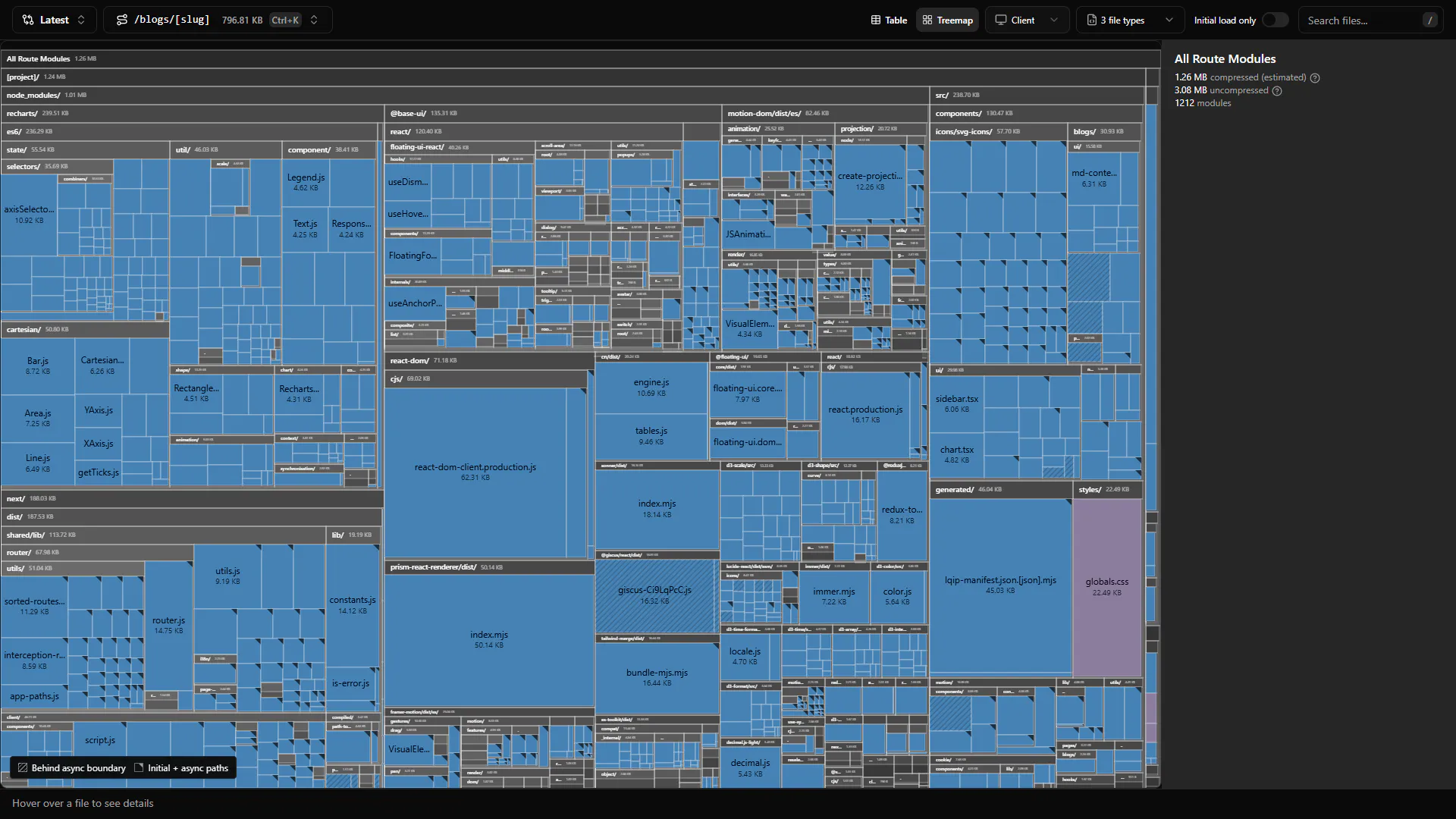
We are currently viewing the dynamic slug /blogs/[slug] page which statically generated with getStaticProps as it's shown at the top left corner and I am able to switch between the pages. At the right side we can see the size of resolved modules grouped by it's type.
Breaking Down the Analyzer UI
If I zoom in,
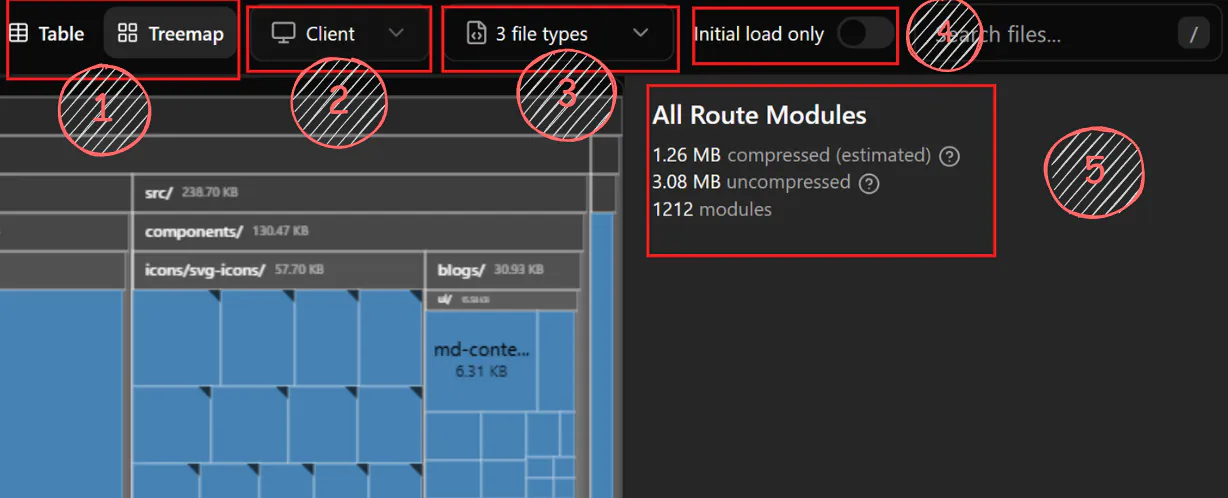
I've marked each part to clarify their role in this:
- Switching between the views, there are 2 modes on that; treemap which we see above and the table map and when switched, it looks like this:

I can sort things out and identify the modules that take up the most space. Each list item is collapsible, and you can open them up to inspect them. It's pretty useful, and I'll be using this view soon, too.
- Again a filter feature to sort out the modules only used on the server/client side. The trick is that when the filter set to client, you're never going to see a pure client component marked as client unless its and asset like the css or font files. Instead, alongside of the client mark, you're always gonna see server mark, because the client components inherently are server components by default(see RSC). You can probably and only see assets marked as client.
- Enabling us to filter by the file types: JS, CSS, JSON and Asset options are available.
- It's a switcher that tracks and displays only modules with an initial synchronous path. In other words, this is where the optimization shines. When enabled, fewer shipped modules can be measured due to lazy loading optimizations, which defer the application of modules until they are needed, rather than initially.
- This shows the total size of the module. The compressed version estimates the number of bytes needed to download the bundle, while the uncompressed version helps identify the modules that contribute to the bundle's size. The compressed size is primarily used for transfer costs, while the uncompressed size is a diagnostic metric.
Lastly, let's move to the top right side of the site.
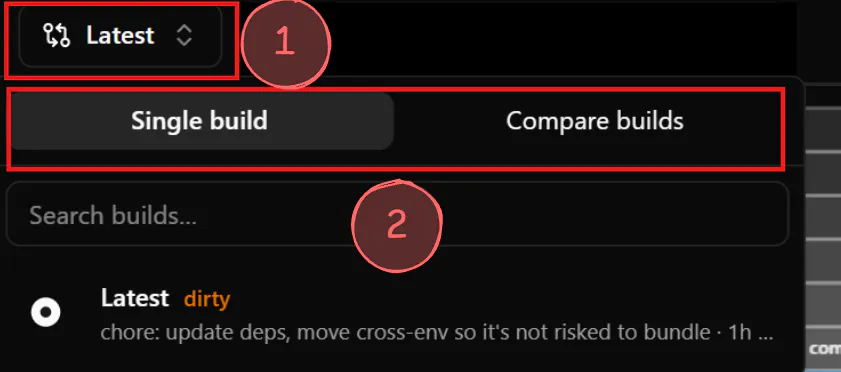
This part is completely related with the auto generated folder by Next.js called .next
Each time you build your project, it is exported with an ID, which allows me to switch between builds. The selection component marked as "1" opens the pop-up. As its name implies, the second selection marked as "2" allows me to switch between tabs to compare builds and see how they impact the project. Recently, to clean things up, I removed the .next folder, which also deleted the old build. However, you will still be able to switch between builds as long as you keep your .next folder.
I found that it's also fetching the Git commits and tidying them up. It turns out that they're easily trackable builds, which is a good thing.
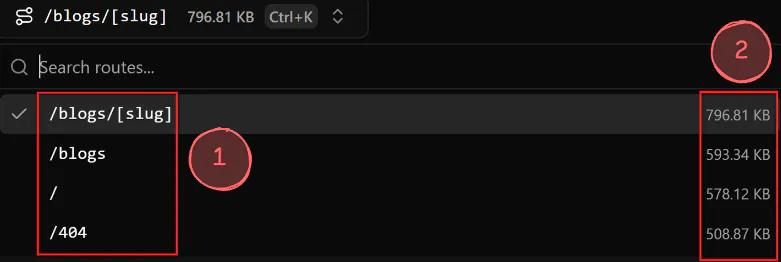
- Static and dynamic pages are found in the app. If a page is marked with a slug, then I can understand that it has multiple variations of the same schema.
- It includes the generated artifacts by Next.js. This differs from the compressed module size because the artifacts belong to the app itself, not its dependencies. Regarding the dynamic slug, statically generated blog posts are rendered in our file exactly as seen here.
Because we're using getStaticProps on that page telling Next to build it's artifacts which results in JSON files.
For those who might be curious, the file starts and ends like this:
Each one contains the full data of an article. The analyzer shows the total page size under the hood. To verify this, take a look at the folder containing the generated file routed inside .next/static/blogs/*.
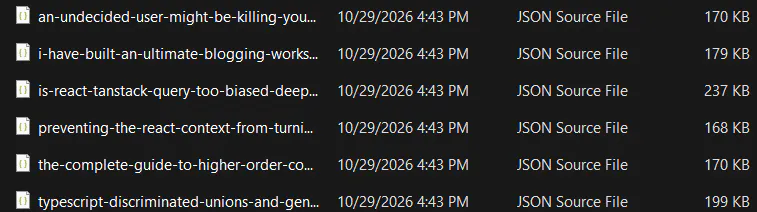
Measuring Current Highlighter Library
6:45 PM
My target is prism-react-renderer and everything around it, so I searched for it in the search bar. After that, I got a highlighter module like this one.
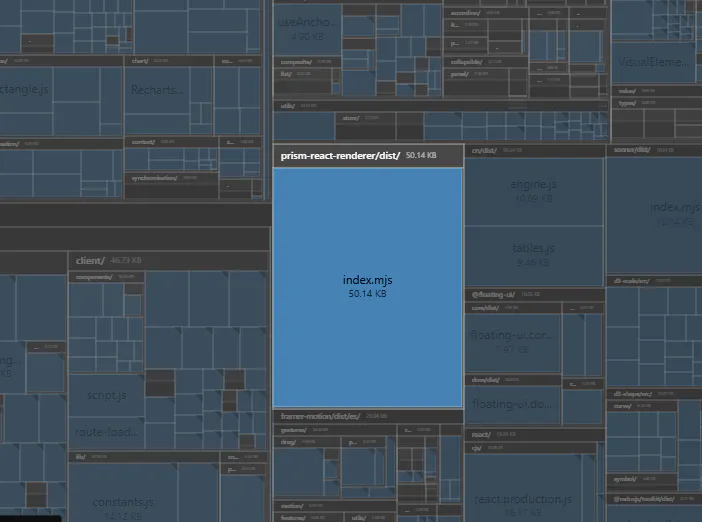
50.14 kB. As I told you, my goal isn't to reduce the bundle size. It's ensuring that a better alternative doesn't blow up through the app.
I'm switching to Table View to see how the module is passed to its target.
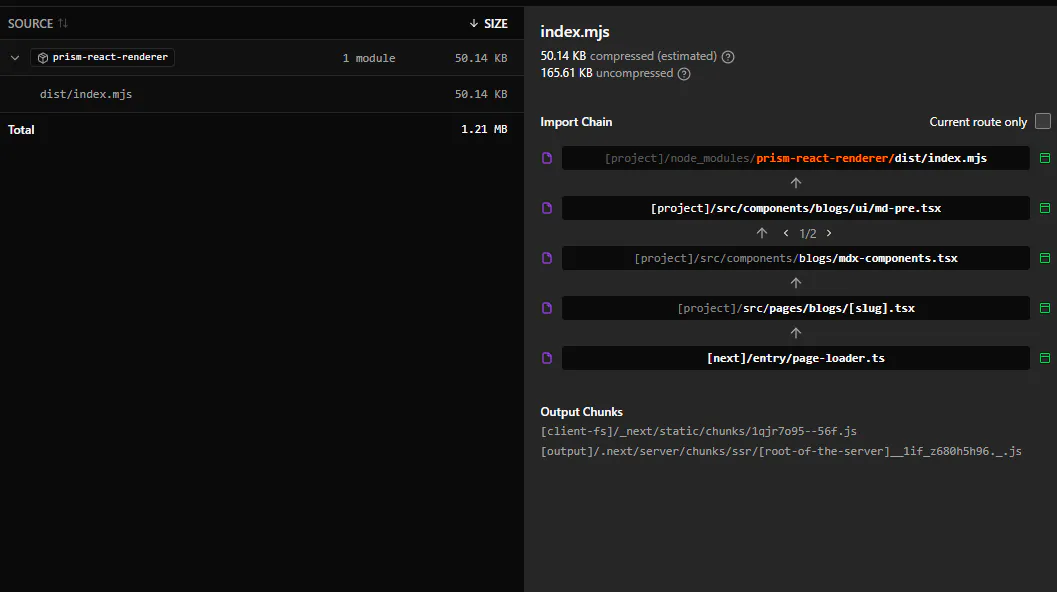
I'll note the measurements here for initial load only mode.
- 50.14 KB compressed (estimated)
- 165.61 KB uncompressed
- Initial vs. without, 0kB diff.
Now it's time for me to implement Shiki.
Switching Between Libraries (Before After)
7:45 PM
I've done implementation. The time it takes to open an article is noticeably faster. For those who are curious, I used a promise-based singleton with the JavaScript Regex Engine instead of the default Oniguruma Engine to render tokens. I don't know what I've been using so far with next-mdx-remote-client
I added the following optimizations to the highlighter component:
- Module-based lazy loading with dynamic export.
- Singleton pattern to ensure instantiation doesn't repeat twice.
- Removing pre mdx component from barrel export.
- Eliminating internal re-render issues.
The results are surprising because, even though I switched to something more extensive, I measured a reduction in size. 🎊
| Initial Load | Compressed | Uncompressed | Diff |
|---|---|---|---|
| Shiki (new) | 46.76 KB | 146.54 KB | - 3.38 KB |
| next-mdx-remote-client (old) | 50.14 KB | 165.61 KB | + 3.38 KB |
The diff in the next analyzer treemap view is visibly changed as well,
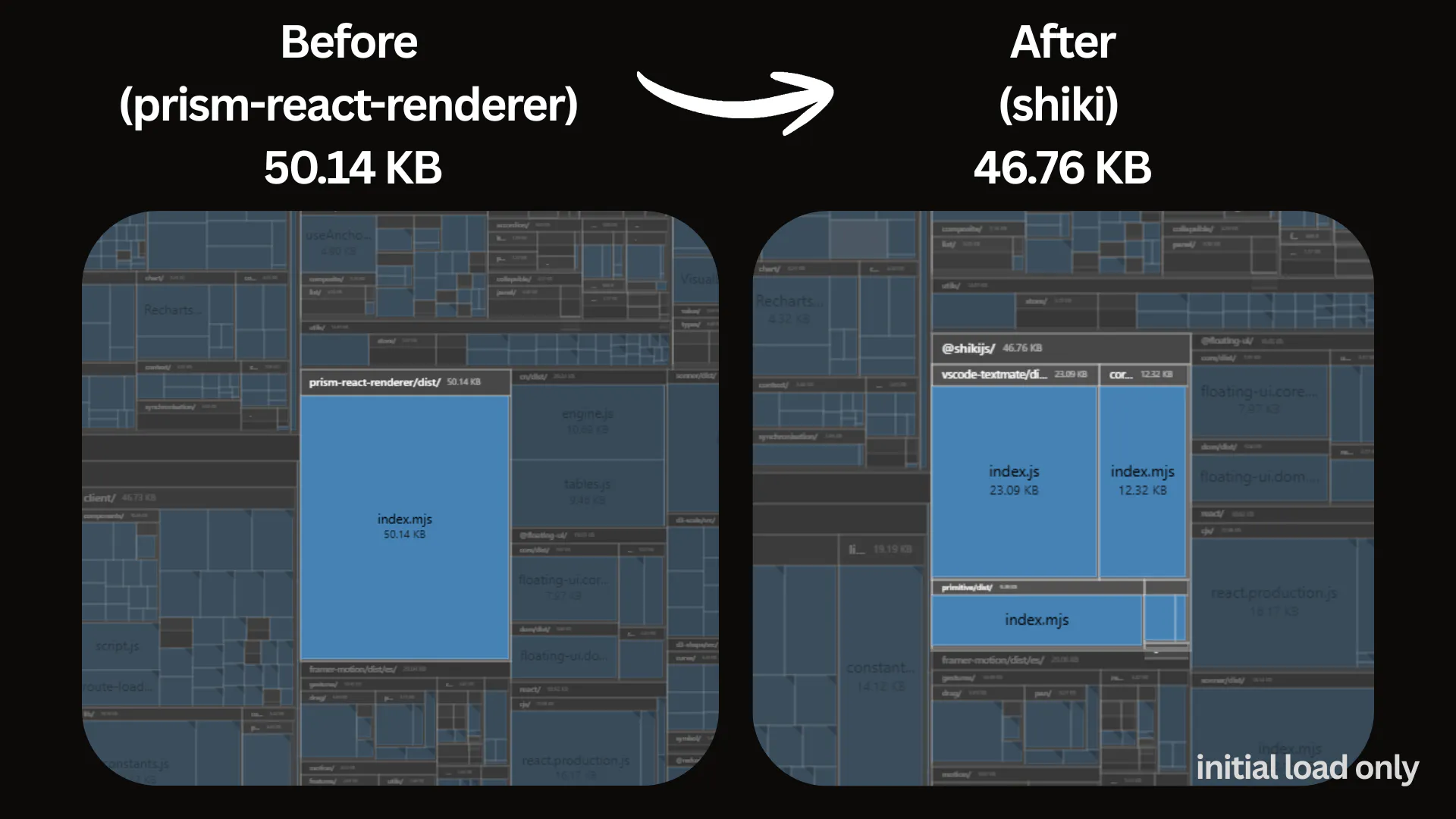
You're probably seeing the updated version of the syntax highlighter in this article now, but if we show you a before-and-after comparison, it would look like this:
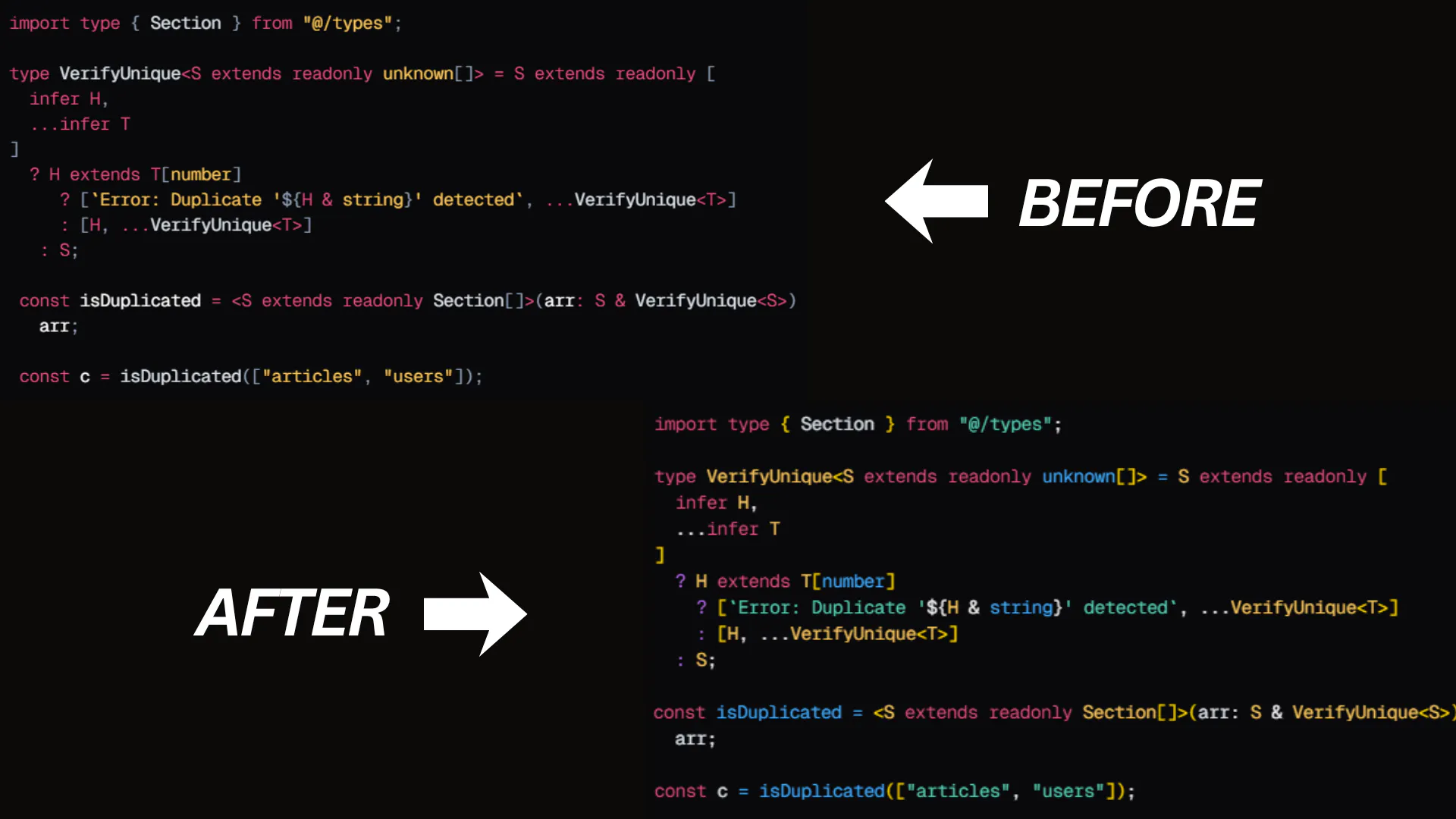
Keep in mind that these measurements only apply to the initial load, which differs dramatically in size. In the context of my goal, this is an achievement. However, if your goal is to reduce the overall bundle size, then it is not an achievement.
Lastly, I checked the Compare Builds tab to show you the actual difference.
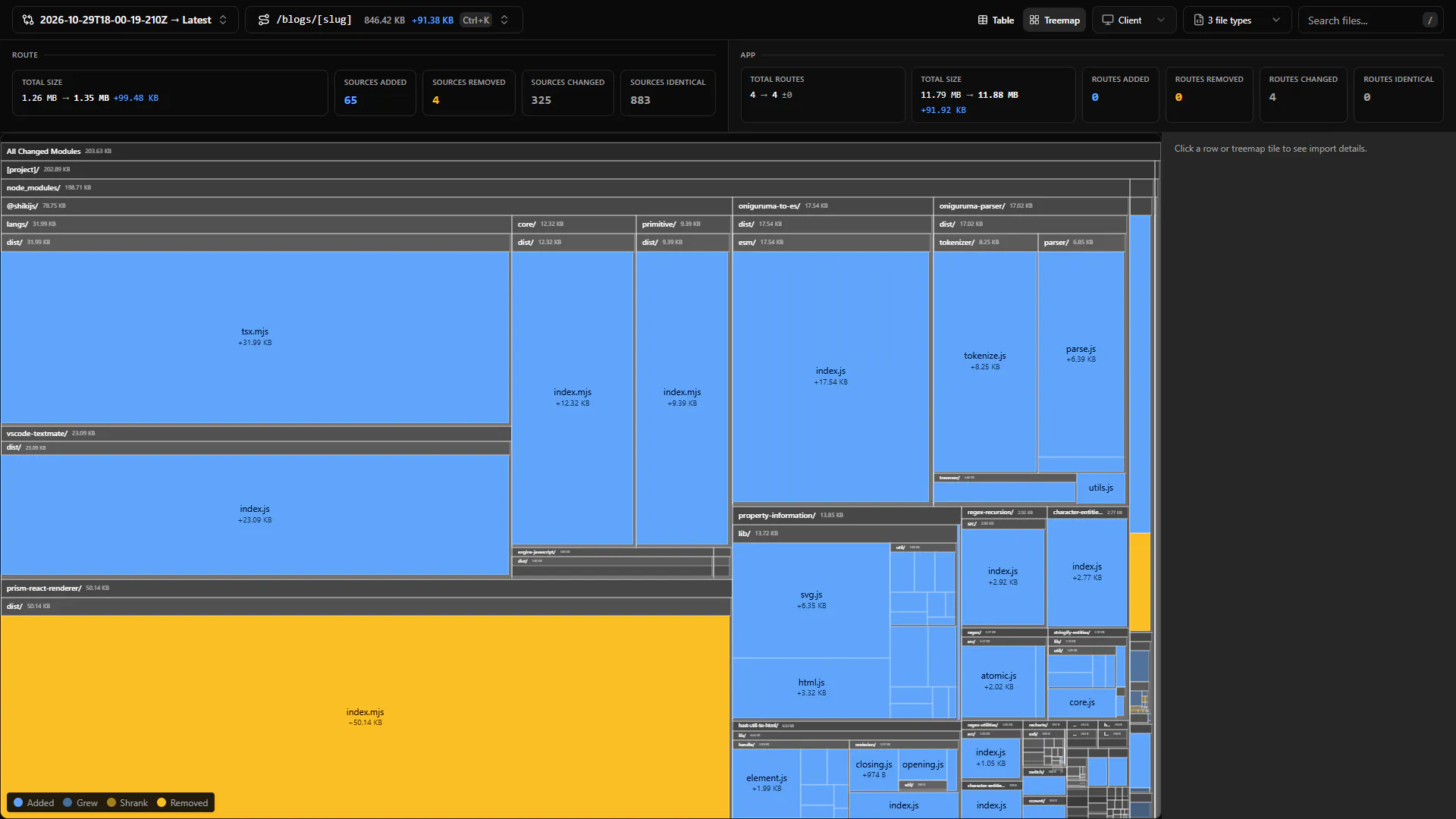
+99.48 KB may seem like an overhead to you, but it's actually a better version of what you see marked in yellow. What matters ever is that it's lighter on the initial load depending on the goal we put in this article.
Summary
8:15 PM — everything took five hours, including writing the article, performing all the optimizations, and crafting these materials to help you illustrate things better. I think it's fair. 🙂
Replacing a front-end library isn't always about reducing bundle size, it's about understanding its impact on the application and making informed trade-offs.
In this live experiment, I replaced the existing syntax highlighting solution with Shiki, configured lazy loading and did optimization staffs, ultimately reducing the initial compressed bundle size by 3.38 KB despite switching to a more extensive library.
You can inspect the implementations and shiki components using the links given below,
Thanks for reading.