
We mostly do require limitations based on the user's activity when building our front-end to prevent excessive API calls on the server-side that may bloat the network waterfall and eventually slows down both — the front and backend
The same applies for the client-side events that we don't anticipate to occur in prod when building an app.
To simulate the bottleneck, I have created an imaginary app for a "first-time" customer. We will address this issue implicitly throughout the article with a little bit of improvision ofc.
| Category | E-commerce |
|---|---|
| Tech | React, Next.js |
| Target | User searching a book for his kid |
| Impacts | A direct impact to the URI via query params |
| Psychology of The User | Hardcore — In rush, impatient and undecided |
Most of the Apps Require Debouncing
Imagine an impatient user who is undecided and looking for something. They mess around with your search bar, which then becomes unresponsive due to the excessive number of API calls, because your client-side search bar was designed solely to change the query parameters.
Say we have a React useState which internally being used inside our custom hook that triggers on each keystroke. An effect runs — externally somewhere else — sending a fetch request to the API to sync with the user query inside URI's query param.
| Route URL | example-ecommerce.com/discover?q= |
|---|---|
| 1st attempt | ?q=bo |
| 2nd attempt | ..?q=boo |
| 3rd attempt | ..?q=boot |
| 4th attempt | ..?q=boo |
| ...10 more attempts | — |
| 16th attempt | ..?q=book%20%for%20%kid |
| 17th attempt | ?q=book%20%for%20%kids |
When it comes to an app welcoming 1K+ MAU users, the impact would be pretty disruptive without debounce on the server. Assuming 300ms debounce, HTTP/2, about 200ms between keystrokes. So the Response time per attempt (ms) likelihood would have been illustrated as shown below.
Worst Scenario without debouncing
Let's picture our imaginary search component in React that listens the input changes in a way that it eventually syncs with the query strings via useSearchParams()
If we want the app to be scalable, we better not compromise on the distribution while striving to keep the semantics. In short, one giant <SearchBar /> is always ugly and sluggish pattern compared to partially designed component system that scales.
Yes, it would be much easier for me to implement an aggregated component without using any query params, replacing them with a server action that submits the internal state without manipulating even touching the query params.
At least then I could have managed everything in one giant file, but the system itself would have been prone to errors caused by even the slightest detail being overlooked, something being forgotten while I was taking a sip of coffee and thinking about what to prepare for dinner, who knows...
Debouncing Implementation Without React
What is Debouncing?
Debouncing, in the context of programming, means to discard operations that occur too close together during a specific interval, and consolidate them into a single invocation.
That's fairly enough to become one of the most important pattern to be eager at through the front-end engineering. Our undecided guy as alone may not indicate a bottleneck but many of them do. To prevent such behaviors like overloading the server that we address in this article, we must implement.
Why Debouncing and Why Not Throttling?
It always depends on the outbound thing that you're working on. If the type were a function rather then a value, throttling would be better pattern to go with. The throttle is designed to apply a rate limit to function execution, by design.
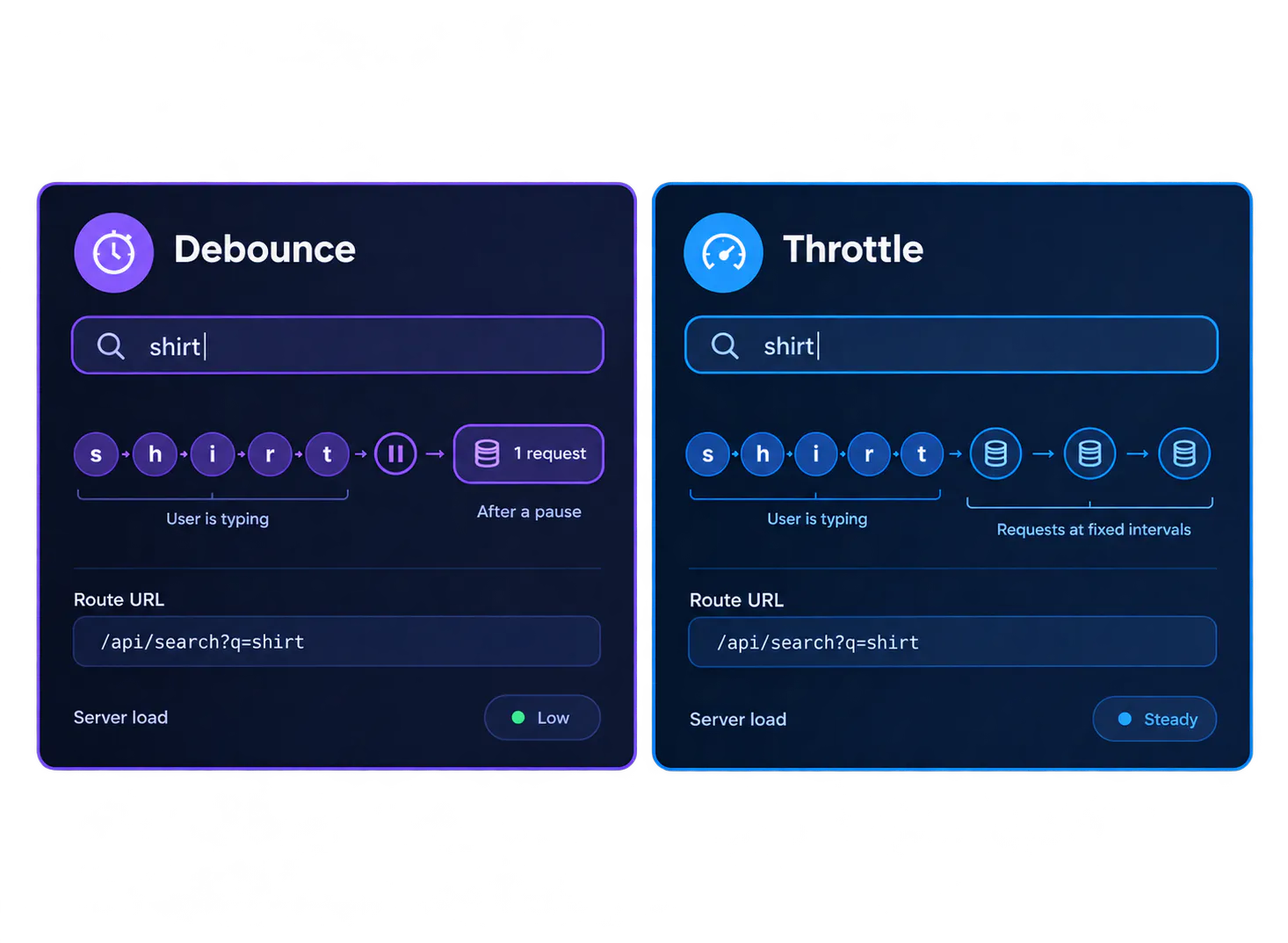
As you can see, debounce is highly dependent to other conditions like the keystroke speed or pause rate of the user while throttle is simply, not.
Implementation
A simple Debounce function in JavaScript:
When the returned (Debounced) function is called, it clears any previously set timeout and sets a new timeout to execute the callback function after a delay of t milliseconds.
Therefore, the number of keystrokes while searching decreases dramatically.
Enriching this function with TS:
If you do work solely on Node, you can also use NodeJS.Timeout instead of ReturnType<typeof setTimeout>.
I wont get into the weeds of type inferring and other implementation practices in this article, I have already addressed comprehensively in my other articles. If you're struggling to understand the context of what's written above, you can check those out.
Debouncing with React and Typescript
It's way far simpler than the one above thanks to the lovely useState(). No need to deal with binding or applying things which makes our work easier.
Implementation
So, we're going to need a reusable custom hook where we can put wherever we want to make values debouncy. Let's call it useDebouncedValue or you can go straight with useDebounce as you wish.
We will utilize 2 things and wrap everything around them:
- useEffect
- useState
Btw if you have better naming convention, put it in the comments 😄
Or,
A generic type at the top is all we need, allowing us to infer the type automatically without needing to narrow it down from the component where our hook is being called .
TypeScript Caveat: It's dead serious important to mention that the generic type inferring is the best fit here, otherwise you could struggle with determining isolated type granted only for the state. Definitely an anti-pattern like useState<string | number>(value)
Using it in Our Search Component
The only action that can be associated with the custom hook we created is the query value. So spotting it in our very first React component and implementing the hook around it would have looked like this,
Since we haven't given a word to the useSearchParams I had to use the effect inside the <Search /> component. However please consider that it's not an ideal pattern to go with. Instead, we should have used it inside the existing effect of useSearchParams hook not where it's called. What we did is nothing but adding overhead.
Conclusion
Our undecided shopper is not an edge case. He is the default user, and every keystroke he makes is an event your app has to survive. Without a limit, 17 keystrokes became 17 requests, and the cost multiplies with every other user doing the same thing. With a 300ms debounce, the same session fires 3.
The fix is small. One generic hook, useDebouncedValue, sits between the input and the URL:
- The input binds to local state, so typing stays instant.
- The debounced value is the only thing allowed to touch the query params and trigger a fetch.
- The server sees the user’s intent, not the hesitation.
Thanks for reading 🖖