
Welcome aboard to the very first session!.
I'm thrilled to share something with you especially when it's first — always makes the things more valuable(at least for me). I intended to cover traditional ways of data fetching vs. newfangled ways in Javascript. I'll try to address the answer of cause-effect relations.
In addition, This is one of three chapters(might be more, I'm just saying) under the same name with this article.
Well, no more fluffs. Let's dive into the logic.
Disclaimer: None of my writing includes direct source of AI. All concrete, synthesized with the original source and my own conclusions/summaries. LLMs are only used to access specific knowledge bases or to create informative diagrams.
What is a query?
To address the related clarification for this article, I suppose that we must go back to the very beginning of the term "querying".
In dictioneries such as oxford dictionary, a query /ˈkwɪəri/ indicated as anglicized form of the Latin imperative 'quaere!', used in the 16th century. In English as a verb in the sense inquire and as a noun meaning ‘query’, from Latin quaerere ‘ask, seek’. In other words, it is a question or request for information.
When it comes to computer science, the term has specific — typically posed to a search engine or a database written in a special language, such as SQL to retrieve, add, change, or delete data known as ‘CRUD’ that you might likely familiar with. I believe, every reactive machine eventually does a CRUD and it is the thing that makes it reactive. You can think it as a high-level component inside your computer that provides you to read this article or when updating the research results obtained from a trained AI. As you can see, we can expand on examples numerous times — from the most primitive to the most advanced tech-beings where people utilize them, in various and common scenarios.
The brain is actually does millions of queries as well and in my opinion, as other things like planes(looking to the birds and it's aerodynamics), we might have ended-up finding the "query" term by evoking the formations around us. In our case, wouldn't it be fitting to make associations with our brains since the brain responds to stimuli just like the HTTP req-res cycle?.
As we mentioned earlier, the relevant fields for "query" regarding to the intention of this article might be grouped under three headings:
- Database Query
- Web Search Query
- Query String
Database Query
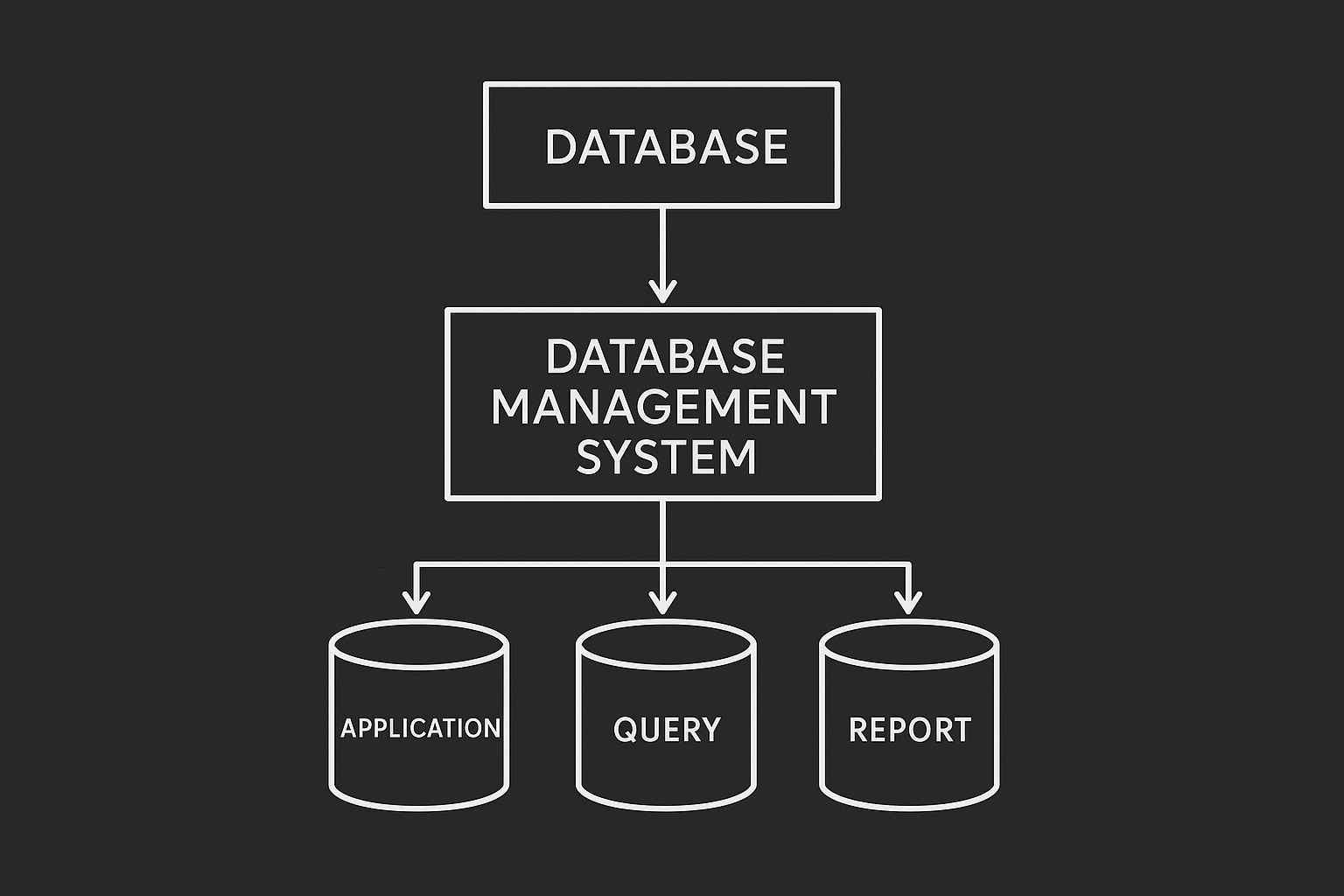
Database query is a request to database management system(DBMS) in order to retrive particular data that is saved in the remote accumilator server. The query usually contains bunch of utilities related to what the query was requested for. Say a fav track in your Spotify, an annoying thumbnail video in Netflix inside the movie listing. All these includes a query itself in stages like pending or success.
Web Search Query
A user types into a search engine in order to find information on the web. The search engine processes the query using algorithms to provide a list of relevant results. Better to break down the context list in order for better understanding. Source used down here.
- Query Interpretation: The search engine first analyzes the query to understand the user's intent. Corrects spelling errors, recognizes synonyms, and considers the context — say the user's location, language, and search history.
- Indexing: The system doesn't search the live internet; instead, it rapidly scours it's massive, pre-built, giant database of information gathered by "web crawlers" or "spiders" that constantly explore and categorize web pages.
- Ranking: Basically, the search engine assesses the indexed pages for relevance and quality in relation to the query. Hundreds of factors are considered, including:
- Content relevance
- Quality and authority
- User experience(This is where we will deep dive in this article)
- Freshness
- Results Presentation: The search engine results page (SERP) is generated and delivered to the user's browser, typically listing the most relevant results at the top, along with paid advertisements or other features like featured snippets or knowledge panels.
When it comes to SEO, the importance of indexing is huge. Your boring clients most likely wants to see the product in higher-ranks rather than interesting in with the clean-codebase. At this point, GSC(Google Search Console) is vital. In order to utilize from the ranking benefits, do not forget to register the app into GSC(Google Search Console) for better indexing. In addition, creating meta tags, sitemaps, considering page's render method(SSR, PPR, SSG, CSR) regarding to app's intention are vital as well. FYI: Search central

All of these above contribute to SEO directly. I couldn't move on without mentioning these things especially when it comes to query.
Query String
Query String is an optional part of a URL (Uniform Resource Locator) that assigns values to specified parameters, often used to track information or control page appearance. I have noticed that the most common use of a query string is to use URL as a shareble/public state managers in the fast-paced evolving modern web. This is what exactly the twelve factor app indirectly emphasizes.
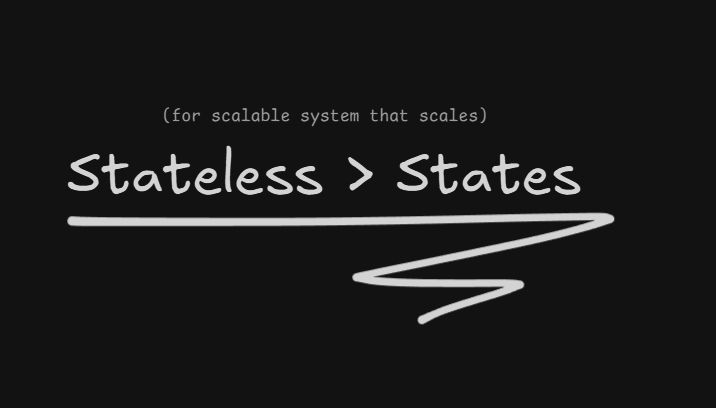
Using states, which means saving an instance in the client's memory, indeed violates scalability. When a registered user adds an item to the their shopping cart in the device A(say PC) he should be able to see that added item also in device B(say mobile device). This both creates an impression and keeping the retention stable that is likely increase purchase rate. So at the end of the day focusing on being stateless is vital in terms of scalability and accessibility.
As we mentioned earlier, understanding the parts of a URL is essential knowledge and non-trivial fact. Therefore, I genuinely believe a URL is a must-known thing when it comes to programming and that's why I wanted to cover this topic thoroughly — especially when we're addressing the actual matter of query. Down below, I've tried to emphasize decomposition of the URL parts roughly.
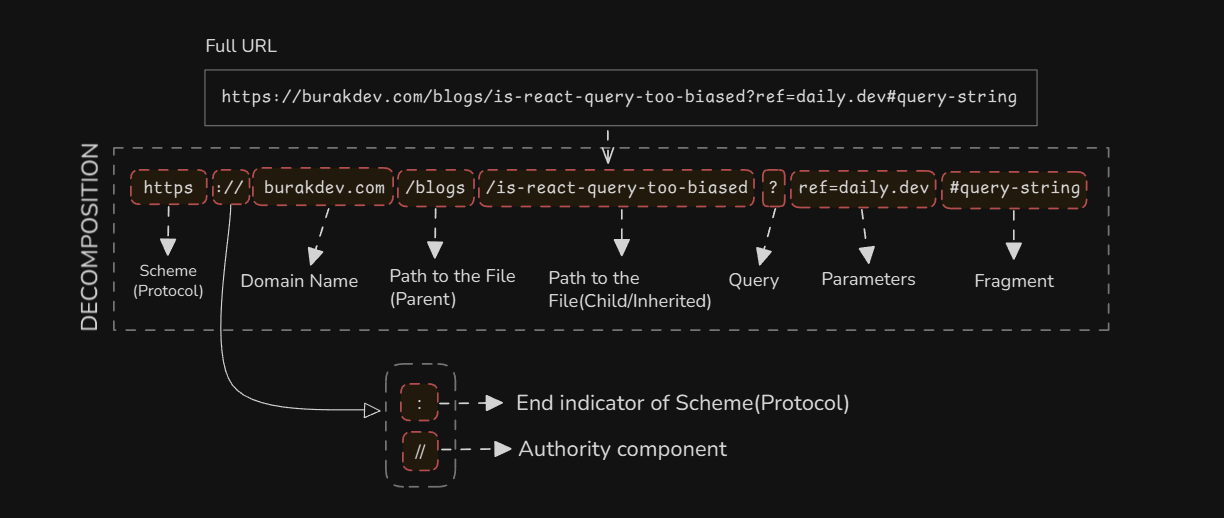
Interestingly, according to Tim Berners-Lee later said the double slashes '//' inside a URL were actually unnecessary - they were included based on pre-existing conventions for server names, but he felt they could have been omitted XDD.
What is React Query?
Well, I think we are quite sure about what the query is so let's move on our actual topic — React Query or we also cane say Tanstack Query since the all ecosystem cumulated under one name, which is the great Tanstack.
Overview
As the name implies, in my words React Query is a filling the missing gaps of data-fetching as mentioned in the official documentation of Tanstack Query.
Overall, React Query makes fetching, caching, synchronizing and updating server state in web apps. The documentation also emphasizes the common state management libraries, such as redux are not as good as Tanstack when it comes to server state because, their structure designed for genereal use rather than server-driven goods.
In this chapter, unlike getting into the weeds of react query technical details, it's better to mention it with introduction-like style superficially. Below, I have broken down the subheadings into a list.
- Common usage scenarios
- Comparison in table view with relevant techs
- React Query with React Native
Common usage scenarios
The main goal of React Query is to serve as a request reducer in any type of web application. By interacting with network boundaries.
Here are some of the most common usage scenarios of React Query:
- Fetching and caching A paginated product list for an e-commerce category with background refetch to keep prices and availability fresh.
- Infinite scroll for a social feed that loads and caches additional pages as the user scrolls.
- Prefetching product details on hover so the detail page opens instantly.
- Performing optimistic updates when a user likes a post or edits a comment so the UI updates immediately while the mutation runs.
- Sharing a cached authenticated user profile across header, settings, and dashboard components to avoid duplicate network requests.
As you may noticed, fetching, prefetching, mutating, caching and so on. Simply put, these are all fundamental things when it comes to data manipulation directly correlated with UX, DX, UI. It makes life easier for developers by eliminating the need to rewrite everything from scratch. Speaking of which, let's take a quick look like a speed run in minecraft at data fetching in chronological order.
The big picture — evolution of data fetching in Javascript
Moving on without addressing this topic would have left people wondering. We have mentioned just the latest modern data fetching methods until now. So for the sake of this article, I have also decided to mention the evolution of data fetching in Javascript with quick snippets to fill all the missing gaps.
Grouped everything for you in chronological order for better impact.
The 'Before AJAX' in other words, pre-AJAX Web Experience (1999 and older)
Before AJAX, the traditional web model was synchronous and page-driven, meaning virtually every user interaction that required new data from a server resulted in a full page and of course with a rigid pattern. Imagine praying just to not see a white screen. How boring...
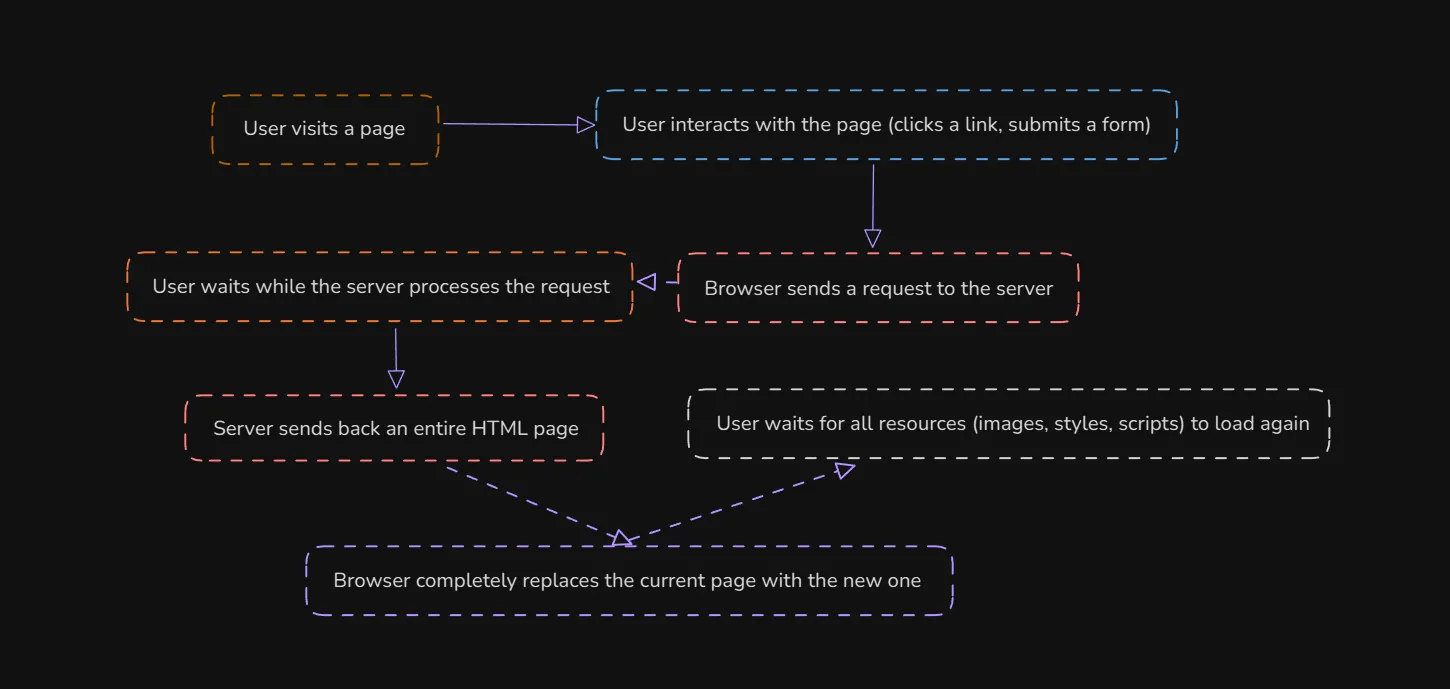
This model followed a rigid pattern:
- User Interaction: User would click a link or submit an HTML form using a GET or POST request.
- Browser Request: The user's screen would often go blank(see image below) or show a loading indicator as it waited for the response.
- Server Processing: When retrieved the necessary data, and dynamically generated an entire new HTML page (or updated a full page template).
- Full Page Reload: The server sent the complete HTML response back to the browser. The browser then discarded the current page entirely and rendered the new one from scratch, along with all associated assets like images, CSS, and JavaScript files.

The AJAX Revolution with XMLHttpRequest (Early 2000s)
The introduction of async JavaScript and XML (AJAX) was groundbreaking. When came out it was pretty promising no more clunky experience for users in early 2000s and the sector had practically revived as it made background jobs possible after named payload. Long live XMLHttpRequest!
Mechanism: XHR or in long from XMLHttpRequest uses event handlers and callbacks to manage the different stages of a request and eventually returns an observable object. Limitations: This approach was verbose and could lead to one of first-seen "callback hell" problems in js history with deeply nested callbacks for multiple requests, making code difficult to read, manage, and debug.
A XMLHttpRequest example can be given like down below:
Caveats: Please pardon for my ignorance, but I've realized something that you might say "Oh Burak seriously?". Node.js doesn't have XMLHttpRequest built into its runtime — it never did. When trying to execute what I have written above in my node(v24.0.1) snippet. But instead, I've encountered this error and wanted to mention:
Current use cases of XMLHttpRequest
-
Progress tracking for file uploads XHR or with long form XMLHttpRequest has better native support for monitoring the progress of file uploads than the Fetch API. For this reason, some devs still use XHR specifically for this task.
-
Support for older browsers Supported by older browsers that lack the Fetch API. While the need for this is diminishing, it can be relevant in certain niche scenarios or for certain user bases. Acting like a polyfill/fall.
-
Setting headers View more about the implementation
Bottom line with XHR, sticking to modern solutions like the built-in fetch() method that we're about to talk about yields the best results when it comes to data fetching.
Promises (ES6/ECMAScript 2015)
As I mentioned above, the callback problems had gone off the rails with XHR. This created an opportunity for the core maintainers of the modern web to invent at least one workaround that would turn into a specification. Then, in ES6, JavaScript officially introduced Promises as an emergent feature.
Unlike nested callbacks — developers now could chain .then() methods for successful responses and a .catch() method for error handling, resulting in flatter and more readable code. A tiny spoiler from one of the next heading: once standard async/await was introduced, the developer's life became easier and hence, because of its's alignment with promises.
The Fetch API (Around 2015/2016)
I guess this one is the most efficient way to get some data from the internet that is being used even in last quarter of 2025. Yet interestingly, it has been 10 years since the built-in fetch() method came out as a solution for the refinement of legacy data fetching molds such as XMLHttpRequest that we mentioned earlier. Simply put, the XMLHttpRequest API was largely superseded by the more modern and efficient Fetch API, which is built on promises from the ground up. Thus, fetch function started to provide a simpler, cleaner interface for making network requests that led to better DX thereby.
The eventual breakage was it's modular design and data streams that are being used under the hood, which is beneficial for performance and memory usage when dealing with large files.
Mechanism of the fetch() API returns a promise that resolves to a Response object. To access the actual returned data, a second promise-based method like json() must be called.
For better clarification, I've prepared a specific snippet, assuming that our goal is fetching this article's <lastmod> tag to prove how up to date and fresh my articles are ✨:
This snippet yields:
And yeah, I slightly realized the date format I used inside <lastmod> tag is not following the W3 ISO STANDART. While I get to work on this, you may have a look this microsoft report about sitemaps where we mentioned the importance of sitemaps right above in Web search query section.
58% of hosts have at least one XML sitemap (sitemap known by Bing) while 42% of hosts don’t have one XML sitemap (Bing does not know it), this is absolutely insane! Almost half of the web, opt-out from indexing boundaries by crawlers. For those where <lastmod> attribute set that is taking the compounds around %84 of sitemaps, %18 have lastmod values not correctly set. — direct source: Microsoft bing blogs
I genuinely believe if you haven't grabbed your sitemap yet, go compose your sitemap ASAP in order to use your map because I want you to never forget, in my articles you're a Capitan and not knowing which way to go is no different from an elderly man walking down a dark, unsafe street without a flashlight being mugged by thieves.
Anyway coming back to fetch(). The way I went through right up in the snippet was deliberately uncommon as we used xml with .text() method since the Fetch API does not natively parse XML. In the fast-paced modern web development, the devs are generally tend to follow common data type which is javascript object notation(JSON) that is naturally supported natively. XML (for reasons unknown to me) kinda enterprise-like staff. In regular-basis, devs are likely go with response.json() since fetch method has parsing feature for json files. The very common pattern when using fetch shown below:
A story comes from me and would like convey that experience since we're on the XML subject, I have been participating in the operation where we were responsible to connect notional e-invoice system in poland(KSeF) and I've been collabrating with a indifferent Turkish team.
My part was mostly dealing with an indpendent, original and sophisticated invoicing specifications which was pretty hard staff to overcome with zero polish, but eventually we connected to the system in weeks even though I had limited knowledge and experince in enterprise industry because I was just 20, so no blame for myself :D
Governments(not all) has built their system on legacy standarts since the internet came out. Mostly XML being used for this kind of industry-driven architects, so be aware next time before trying to deal with XML.
I could just put there some sort of basic implementation that I copied from LLM's but such things are out of the question here. I believe my approach is memorable when it comes to maintaining/creating a knowledge-base because I know, one topic can lead to another and another, therefore a shining giant chain would be better than piece of chain that are not matching well with each other. Trying to produce organic content for you so to stay tuned subscribe to the newsletter to get instant update for recent articles and you also can support me financially since writing takes days and I must refill my coffee machine & take care of my wife, thanks from now for your all support ❤️
Overall, the fetch is a magic key when it comes to data fetching with Javascript. Dismissing or ignoring its existence may result in not being hired and staying away from the industry. Embrace it and fetch some data.
Async/Await (ES2017)
The async/await syntax further simplified asynchronous programming by providing a more concise, synchronous-looking way to work with promises. It is a syntactic sugar over Promises.
Until now, we have been using the strategy behind the fetch() API and promises in order to fetch some data. And to do that, we used chained .then()'s to negotiate with what we returned. Clearly, ES15 is more error-prone because its syntax contains composed compounds and nested logic. This may be the reason the core team invented a new turnaround according to me.
I do not know but in the current era of the modern web development, am I the only one feeling like I have to use async/await. Its just makes the life easier for developers in terms of readability, maintainability, testability, scalability to put it briefly — async/await is everything.
Could be wrapped in try, catch block, but since the intention is just showing the usage, it's enough to show up the core funcionality — everyone is already familiar with this.
Warning: To not make the app stuck in pending status, always resolve the assigned request with await. The await keyword pauses the execution of the function until a promise is resolved. Linters and prettiers are your best bet. Personally, I recommend using biome over eslint for your projects because lightning-fast formats just so cool.
Modern Libraries and Frameworks
Aye aye Capitan! You are now entering our time — to the present, congrats and welcome! if you are reading everything from the beginning until now, as it was a very long run — approximately takes 25 minutes, then respect to you 🫡 Now, we're on the verge of entering the phase we referenced earlier. This theme went through the past to the present under the name "Evolution of Data Fetching in JavaScript." and this is the last heading, ending all up with a serious topic since it is all about today.
Today, many developers use purpose-built libraries like Axios for data fetching, or rely on framework-specific solutions such as React Query, which is the main topic we covering so far, SWR, or server components in React that renders ahead of time, before bundling, in an environment separate from your client app or SSR server. In this section, we will briefly discuss all of these.
These libraries abstract data fetching complexities for better efficiency, robustness and of course the DX. Basically, these tools focus on improving performance, managing server-state, and optimizing user interfaces through features like caching strategies, automatic refetching, and the great SSR.
Axios
A popular, promise-based HTTP client. While native fetch can handle most tasks, Axios provides features that improve the developer experience for complex applications.
Interceptors Allows us to globally intercept and modify requests or responses, which is useful for adding authentication tokens or logging.
Below I've curated a boilerplate, an instance of auth implementation with axios although I don't love them and one bonus, HTTP authentication diagram.
Wanted to give referral for Axios but as soon as I checked their official website, I have changed my mind... It's just because the fact I've encountered — ridiculous fact they're showcasing bet companies and stuff in their official website where npm downloads hits up to 72 millions, weekly. It wasn't as bad as sweetalert drama with NSFW sponsors, but it was pretty bad.
The legend — React Query
Between all these data fetching technologies, this is my favorite so far. When it comes to React Query (TanStack Query), it's just indisputable. I've mentioned all of these above, and they're enough to prove that you should leave everything else behind and go ahead with React Query. This is not an AD though.
I've mentioned quite all staffs for this chapter covering react query and planning to continue with implementation and actual practices on the next chapter. So do not forget to subscribe newsletter. Let's move on the next one.
SWR
Developed by Vercel(oh shit here we go again), SWR (stale-while-revalidate) is a lightweight React Hooks library that also focuses on efficient data fetching and caching. The name comes from an HTTP cache invalidation strategy — first returns cached data instantly, then re-fetches the latest data in the background, thus completing stale—revalidate cycle and providing a stream of updates to the UI.
- Simple API: Provides a very minimal and easy-to-use useSWR hook.
- Automatic Revalidation: Automatically re-fetches data when the user regains network connection or switches browser tabs.
- Lightweight: It is a smaller alternative to React Query, ideal for simpler data fetching needs. (The sources say so, NOT me)
React Server Components (RSCs)
This is the topic I genuinely want to cover in a new episode. RSCs are a relatively new paradigm that allows developers to run React components exclusively on the server. Designed to combine the benefits of server-side rendering with the component-based model of React. Therefore, RSCs can stream HTML progressively for the non-interactive parts and reduces JS bundle size. Since it runs entirely on the server, the page loads way faster but not as fast as the website that you are currently visiting, thanks to the SSG(you decide how reasonable this claim is).
To see the actual diff between the client and server and how it yields, have a look:
| Instance / Use-case | React Server Component (RSC) | Client Component | Why / Example |
|---|---|---|---|
| Static marketing page (SSG / CDN) | Perfect re-rendered, no client JS required for content. | Overkill — brings JS bundle + hydration cost. | Just use SSG with Astro |
| Personalized dashboard (user-agnostic) | Good for non-interactive panels (await user data server-side) | Required for interactive widgets, state, and events | Combine: RSC shell + client components for widgets. |
| Modal / click handlers | Not usable for DOM events — can render markup server-side | Ideal — handles events, focus management, animations | Make modal a client component. |
| Forms with validation & instant UX | Server can render initial form, but no useState for instant validation | Required for real-time validation, optimistic UI | Use client for validation, RSC for initial form markup. |
| Realtime chat / websockets | Not suitable for direct socket handling | Required — useEffect, subscriptions, mutable refs | Use client component for socket, RSC for historic messages. |
| Large client CPU work (charts/dragging) | Fine to render static chart markup server-side | Better — client does heavy rendering & interactions | Offload to client for interactivity and animation. |
| Data fetching (one-off, blocking) | Native await in component — simple, no extra client fetch | Fetch in effects or libraries (SWR/React Query) | This is depends Capitan — No comment. |
| Streaming / progressive hydration | Can stream HTML progressively to client | Hydration still required for interactive parts | RSC + streaming improves TTI for large pages. |
| Third-party DOM libs | Can't run in RSC — server can pre-render fallback | Use client component to mount the library | Render static fallback in RSC, enhance in client. |
| Authentication state (server-checked) | Great for ssr tokens/cookies | Good for client-side session state & client-only checks | Check auth on server, use client for UX that depends on client storage. |
| SEO landing page | Excellent — fully server HTML, minimal JS | Works but slower TTI due to hydration | Use RSC / SSG for SEO pages. |
| Analytics / third-party scripts | Execution depends on client | Client component can lazily load analytics lib | Defer analytics to client to avoid blocking render. |
| Component library (UI primitives) | Buttons/inputs that need events must be client | Pure presentational primitives can be RSC-friendly | Export both: presentational RSC + interactive client wrapper. |
A minimal implementation example for RSCs in Next.js 16 app router:
User clicks an article card just like you did. Data prefetched with await. User near-instantly starts observing the content of the page. This is the happenning when it comes to the snippet above.
Bottom line
In a nutshell, intelligently define the strategy for your next project before you/your team starts. Then, depending on the project's requirements and goals, choose the right implementation. The outcome will indicate what to avoid and what to use. It always matters the amount of the people that you're working with, the scope of the project, the budget, the given time and the level of the passion you feel. It always depends and its all about asking. Assessing the parameters at best is the key. Your boring client will always have their boring question. Never intoxicated by them. It's not easy being a developer/programmer/engineer in this life and I believe we have 10-15 years left until before AI completely replaces us. Let's just enjoy ourselves until then. See you in the next one.
What next on chapter 2?
I will probably publish the second part in the first week of this December. My intention is to cover react query comprehensively with more technical terms. The table of contents are shown below. If you do not want to miss, then subscribe to the newsletter to get instant updates.
- CRUD app using React Query
- Why does even a tiny front-end app need React Query?
- Sophisticated React compiler problems with React Query
Today we were talking about Is React(tanstack) Query Too Biased? Deep dive: Real Life Data Fetching Practices — Chapter 1. Subscribe to the newsletter to get instant updates. If you want to support me in order to keep these long sessions coming, you can buy me a coffee — thanks from now for your all supports!